The audit does not
start from a blank page.
The Audit Centre runs an audit from engagement to the issued report, with auditor and auditee working in the same place. The evidence your team produced while doing the work is already in the vault.
Audit Centre · from engagement to issued report
- Draft
- Planning
- Fieldwork
- Reporting
- Closing
- Closed
Evidence mapped from the task register
Illustration of the audit stages.
- 4 audit types
- Internal, external, certification and regulatory
- 3 modes
- Guided, Professional and Compliance
- 5 reports
- Generated from the audit record
- Tamper-evident
- Evidence vault with SHA-256 hashes
An audit, end to end, in one place
Every stage is recorded, so the audit can be defended later.
- 1
Engagement
Scope agreed and independence declared.
- 2
Planning
Frameworks in scope, team and mode set.
- 3
Fieldwork
Evidence from the vault, requests to the auditee.
- 4
Findings
Criteria, condition, cause, effect, recommendation.
- 5
Response
Management responds; a corrective plan is agreed.
- 6
Verify
Corrective actions checked and closed.
- 7
Report
Issued with a formal opinion.
For the auditee
Know exactly what the auditor is waiting for
The dashboard puts pending actions, open findings and active audits on one screen, with the urgent items first and overdue requests counted in days.
- Management responses that are required, marked by severity
- Overdue update requests, with how late each one is
- Every item linked to its audit, framework and control
Audits
Every engagement, with its health on the card
Open, planned, closed and cancelled audits are listed with the facts that matter: type, framework, fieldwork window, report date, mode and progress.
- Critical findings, overdue update requests and document requests to review, flagged on each audit
- Report deadlines tracked, so nothing slips at the end
- Certification audits, including surveillance and recertification
What each audit shows
Findings and corrective actions
Findings an auditor would write, actions that close them
Findings follow the five-part format auditors use and are linked to the control and the risks they affect. Corrective action plans are approved, or returned until they address the root cause.
- Severity from Critical to Informational
- Each finding linked to its control, framework and associated risks
- Clear states: awaiting response, management responded, verified
- Search and filter across every active audit
A finding, in five parts
How an audit is supplied, and who stands in it
The evidence is already here, and so are both teams
Two things decide whether an audit is a fortnight of searching or a week of answering: where the evidence comes from, and who is allowed to work on it. Netra settles both before fieldwork begins.
Policy, risk, asset and vendor work
All of it runs as tasks, and the evidence attached to a task when it was done is the evidence the audit uses.
The Task Engine
One piece of work, evidenced once, credited to every control and framework that asks for it.
Cloud Management
Configuration is read from the accounts nightly and lands as evidence against the control it proves. No screenshots.
Document requests
Anything the programme does not already hold is raised as a request inside the audit and answered against it.
Auditee team
The organisation’s own people, and the managing consultant who prepares and reviews before anything is submitted.
Auditor team
The audit firm, read-only on what has been shared with them.
Through the work, not around it
Policy, risk, asset and vendor work all runs as tasks. The evidence attached to a task when the work was done is the evidence the audit uses, credited to every control that asks for it.
Straight from the cloud
Cloud configuration is read from the accounts themselves and lands as evidence against the control it proves. No screenshots, and nothing that ages between audits.
And whatever is left
Anything the programme does not already hold becomes a document request inside the audit, answered against that request and hashed into the vault on arrival.
Before any of it
An audit begins as a proposal somebody accepts
Scope, framework, proposed dates and who is asking. Accepting an engagement opens the audit with its checkpoints already scoped, which is why fieldwork does not start with a fortnight of setting up.
- Netra · Audit Centre · Engagements
Accepted, awaiting, draft, declined
The organisation sees every proposal in one list, including the ones it has not answered. An engagement carries the framework and the scope, so what is being agreed to is on the record before the audit exists.
One audit
The whole engagement on one page
Scope and lead auditor at the top, the four numbers that decide whether an audit is going well beneath them, and the timeline the certification body works to.
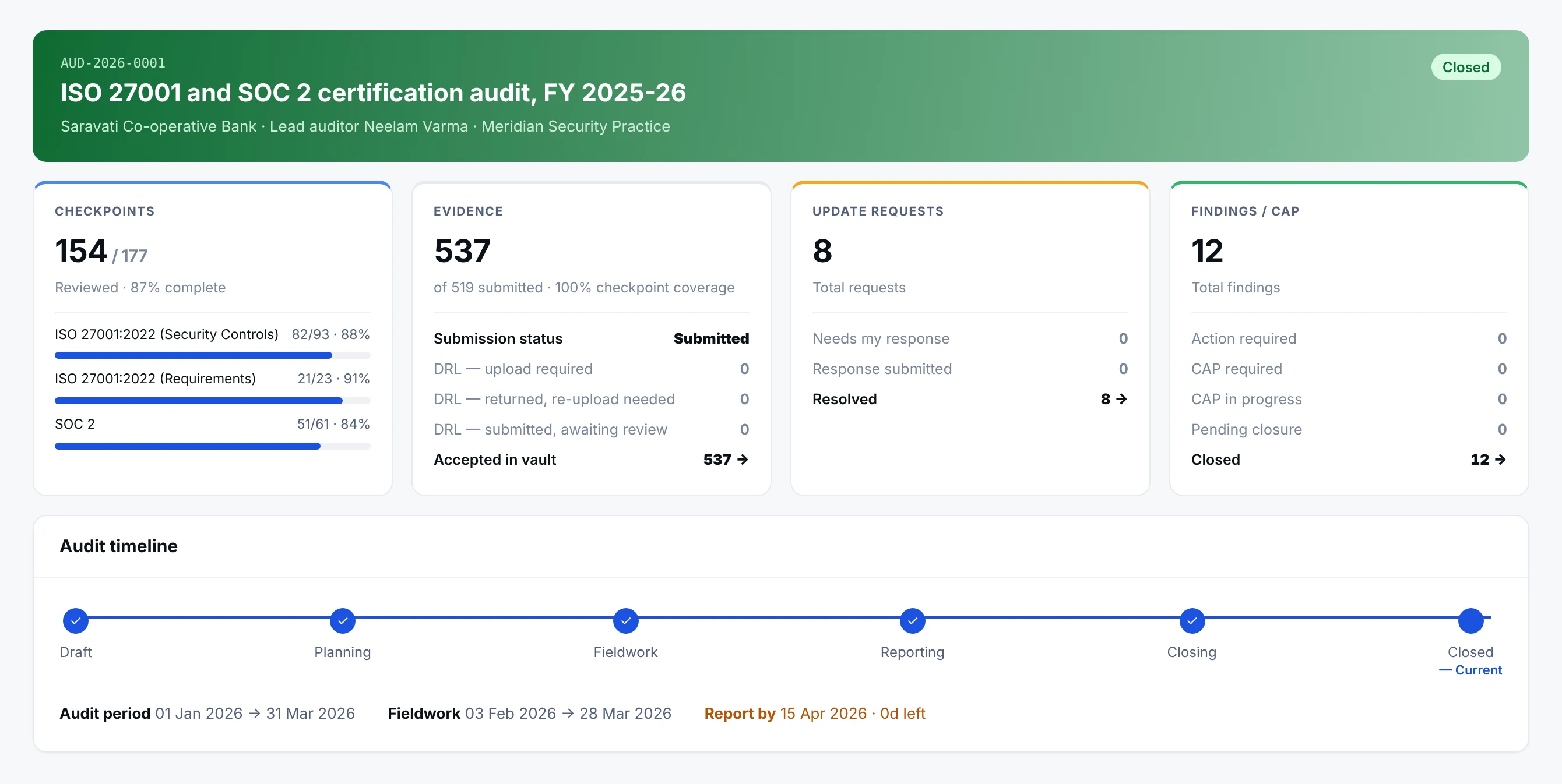
- 1Checkpoints, per frameworkOne hundred and fifty-four of one hundred and seventy-seven reviewed, and the split across ISO 27001 requirements, ISO 27001 controls and SOC 2, because an audit against three frameworks does not progress evenly.
- 2Coverage, not volumeFive hundred and thirty-seven files is not the point. One hundred per cent checkpoint coverage is: every checkpoint has something behind it.
- 3Split by state, not totalledEight update requests means nothing on its own. Nought needing a response and eight resolved is the number that lets somebody go home.
- 4The date that governs the weekAudit period, fieldwork window and the report deadline, with the days left counted. An audit that slips at the end slips here first.
Checkpoints reviewed against checkpoints published, broken down by framework. Evidence submitted and how much of it the checkpoints actually cover. Update requests and findings, each split by what state they are in. The timeline underneath is not decoration: report by 15 April with nought days left is the sentence that decides what happens this week.
Inside a checkpoint
The test, the workpaper and the judgment, in one place
A checkpoint is where an auditor actually works. The procedure says what to test and whether it is a test of design or of operating effectiveness; the workpaper is where the testing notes and the conclusion are written.
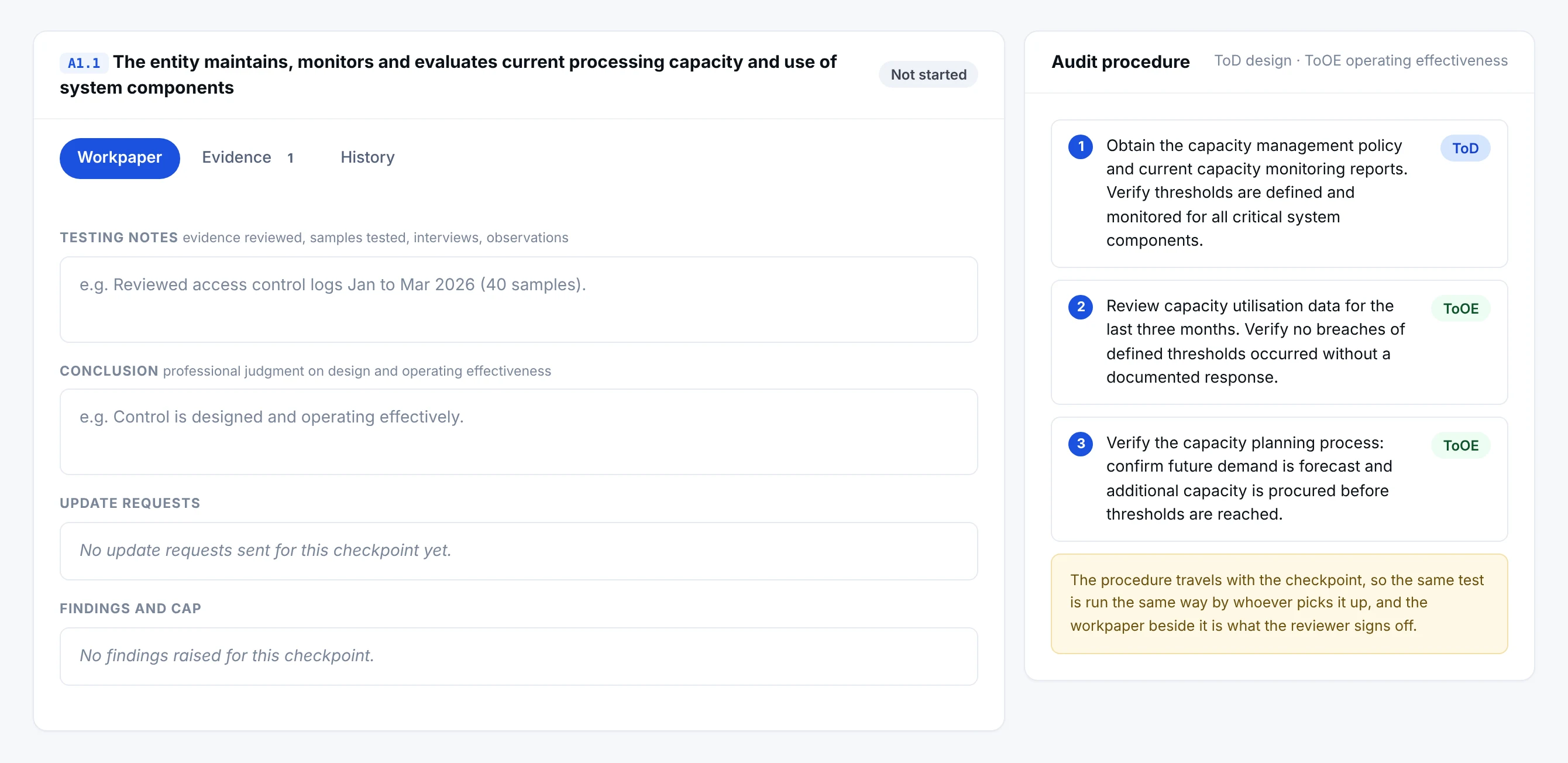
- 1What was actually testedEvidence reviewed, samples taken, interviews held. This is the paragraph an auditor is asked to defend three years later.
- 2The judgment, written downDesign and operating effectiveness, in the auditor’s own words, on the record rather than in a conversation.
- 3Raised from here, attached to hereAn update request or a finding keeps the checkpoint it came from, so nothing arrives at the report stage without a provenance.
- 4ToD against ToOEA test of design asks whether the control would work. A test of operating effectiveness asks whether it did. The procedure says which one each step is.
Testing notes record what was reviewed, how many samples were taken and who was interviewed. The conclusion is the professional judgment on design and operating effectiveness. Beside them the procedure sets out the steps, each marked ToD or ToOE, so the same test is run the same way whoever picks it up, and an update request or a finding raised from here stays attached to the checkpoint that produced it.
The vault
Evidence the auditor can trust, and a request list that closes
Everything the audit holds sits in one vault, hashed on arrival. The document request list is the auditor’s own ask, tracked to completion rather than chased over email.
- Netra · Audit Centre · Evidence Vault
Ten requested, ten received
Each document request carries the control it supports and whether it is mandatory, and the bar across the top is the only status anybody needs during fieldwork. Files are SHA-256 verified when they arrive, so the file the auditor opens is provably the file that was submitted.
The request list
The audit does not start from a blank page
An auditor asks for evidence. In most organisations that begins a fortnight of searching. Here thirty-eight of forty-six requests are answered by attaching what already sits against the control.
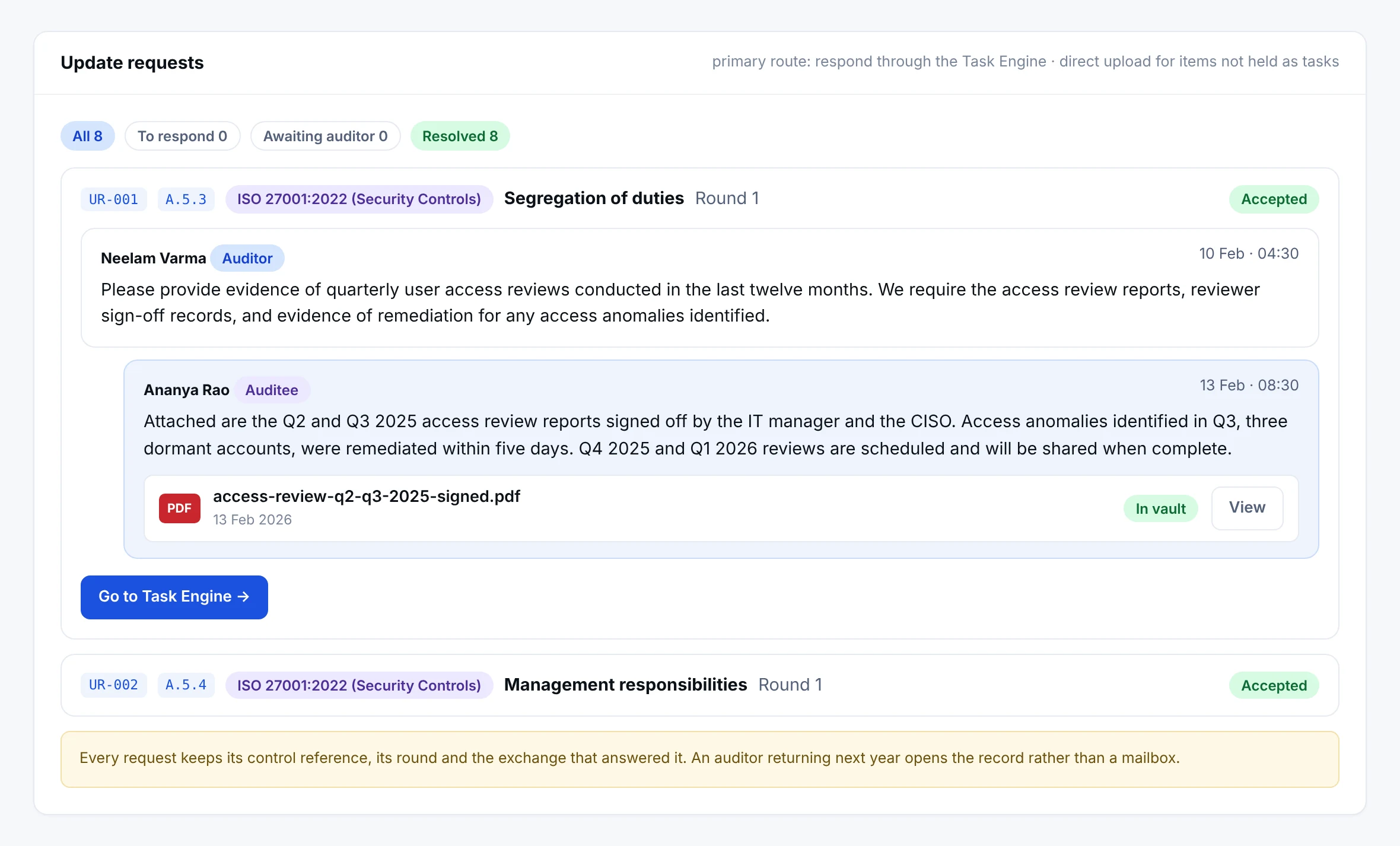
- 1The control, on the requestA.5.3 under ISO 27001:2022. The request knows which control it belongs to, which round it is in, and where that control’s evidence already lives.
- 2The question as the auditor wrote itReports, sign-off records and remediation evidence for twelve months. Nobody has to translate it into a task by hand.
- 3The answer, with the fileThe response and the signed report sit on the request. The file is in the vault, so the same evidence serves the control it came from.
- 4Back to the workWhere the answer is a task, the button goes to it. The audit does not become a parallel exercise with its own copy of the truth.
Every request carries its control reference, its framework and its round. The primary route to answer one is the Task Engine, because the evidence the auditor is asking for is usually a task that has already been done. Where it is not, the file is uploaded against the request and lands in the vault hashed.
What comes out of it
A finding becomes work, not a filing
- Netra · Audit Centre · Findings
Graded, owned, dated
Major, minor or observation, against the control it came from, with a person and a date. The remediation is tasks in the same programme, so the next audit opens on a record that shows what was done about it and when, rather than on an assurance that it was handled.
Who may open what
Two teams, scoped access, and a log of everything done
The auditee contact holds the seat. Delegates are given the sections they need and nothing else, and the managing consultant sits in the same list, which is how a managed engagement runs without anybody sharing a password.
- Netra · Audit Centre · Audit admin
Access that can be explained afterwards
Every action carries a person and a time: who accepted a file into the vault, who answered a request, who issued a report. That log is the answer to the question an auditor asks about the audit itself.
What comes out of it
The reports the framework prescribes, and five of your own
Audit deliverables are not generic. A SOC 2 engagement produces what the AICPA expects of one; an ISO 27001 engagement produces the internal audit report and the nonconformity and corrective action report. Beside them sit five working reports generated from the record.
- Netra · Audit Centre · Reports
Prescribed by the framework, produced from the record
ISO 27001 asks for an internal ISMS audit report and a nonconformity and corrective action report. SOC 2 asks for the control activities and tests, a system description and a readiness report. Each shows whether it is issued, awaiting controls or yours to prepare. The five working reports beside them, the full report, the executive summary, the observed findings, the CAP tracking and the evidence index, are generated from what the audit already holds rather than written afterwards.
Quiet audits. Loud confidence.
The audit becomes part of the process, not a fire drill when the auditor arrives. Evidence from daily work flows in, so fieldwork begins with answers.
See the Audit CentreThe life of a finding
Every step is dated and attributed, on both sides.
- 1
Raised
By the auditor, in the five-part format.
- 2
Awaiting response
Shown to the auditee as an action.
- 3
Management responds
With a corrective action plan.
- 4
Plan reviewed
Approved, or returned until it fixes the root cause.
- 5
Verified
Corrective actions checked, then closed.
Inside an audit
Each engagement has six working areas
An audit is a workspace, not a folder of attachments.
Audit
Type, framework, fieldwork window, mode and progress.
Checkpoints
The tests the audit works through.
Evidence
Drawn from the tamper-evident vault.
Update requests
Questions to the auditee, with due dates.
Findings and CAP
Raised, answered and tracked to closure.
Activity
A running record of what happened and when.
Access
Engagements by invitation, controlled by the audit admin
Authorities and auditors are added by the audit admin, and only the people on an audit see it. Engagements move through draft, sent, accepted or declined, and the status is visible to both sides.
Draft
Being prepared.
Sent
With the auditee for a decision.
Accepted
Agreed, and the audit can start.
Declined
Declined, and on record.
The Audit Centre in numbers
- 6 phases
- Draft, planning, fieldwork, reporting, closing, closed
- 4 types
- Internal, external, certification and regulatory
- 5 reports
- Generated on demand from the audit record
- SHA-256
- Hash on every item accepted into the evidence vault
Six phases, each with a gate
An audit cannot slip to the next stage until the conditions for it are met.
- 1
Draft
The audit is set up and the auditor invited.
- 2
Planning
Independence declared, scope and dates agreed.
- 3
Fieldwork
Controls tested against evidence from the task register.
- 4
Reporting
Findings settled and the report prepared.
- 5
Closing
An audit opinion is chosen.
- 6
Closed
The audit becomes read-only.
Audit prep from months to weeks
The audit is not a fire drill
Evidence is collected as the work is done, so the audit starts with it already mapped.
The usual way
- Months spent collecting evidence from every team
- Files put in folders and sent to the auditor
- The auditor goes through them control by control
- Findings and responses scattered across email
In Netra
- Netra finds the task evidence already mapped to each control
- The auditee selects what to submit and sends it in one step
- The auditor tests each control in one workspace
- Findings, responses and corrective plans tracked to closure
Guidance, reports and who takes part
Auditor and auditee, in the same place
Each side sees what it should, and nothing it should not.
- Sees only what is in scope and what has been submitted
- Keeps workpapers private to the audit team
- Raises findings in the five-part format
- Approves or returns corrective action plans, then verifies them
- Closes with a formal opinion: Unqualified, Qualified, Adverse or Disclaimer
- Starts with evidence already in the vault
- Answers update requests and document request lists
- Gives a management response to each finding
- Submits corrective action plans and tracks them to closure
- Sees every action that needs attention on one list
What else is in Audit Centre
Six-step set-up
Audit details, frameworks in scope, current assessment, mode, team and review.
Tamper-evident vault
Evidence hashed with SHA-256, so you can show it has not changed.
Requests in one place
Update requests and document request lists, with due dates.
Engagements
Sent, accepted, draft and declined engagements tracked.
Activity feed
Findings, requests, status changes and reports since your last login.
Generated reports
Five report types produced from the audit record.
Works on the same record as
A task completed anywhere in Netra shows up here. Nothing is collected twice.
Questions about Audit Centre
What kinds of audits can we run in Netra?
The Audit Centre runs internal, external, certification and regulatory audits end to end: planning, fieldwork, findings, corrective actions and reports. The audit type sets sensible defaults for the engagement.
Can an external auditor see everything in our Netra account?
No. Auditors see only what is in scope for the audit and what you submit. The auditor's workpapers stay private to the audit team. You see checkpoint status, requests, findings and issued reports.
What does tamper-evident evidence mean?
Netra records evidence so you can show it has not been changed since it was submitted. That makes the audit record defensible and traceable.
Do we need to upload evidence again for an audit?
No. Evidence attached to a task while doing the work flows into the audit, so you never assemble it twice. The audit does not start from a blank page.
What is the independence declaration, and can I change it later?
It's a five-point statement of impartiality (no interest in the outcome, no conflicting relationship, no consultancy to the auditee in the last 24 months, will act with integrity, will disclose new conflicts). It is legally binding and immutable once submitted, recorded permanently against your name and this audit. Every team member files their own - it cannot be delegated or edited afterward.
What happens when I Accept a piece of evidence?
The file is copied into the Evidence Vault and locked with a SHA-256 integrity hash - a tamper-evident record of exactly what you assessed. The auditee's original stays live in their Task Engine; your vault copy is frozen. See Evidence Vault in depth.
Do I write the audit report?
No. Netra auto-generates five report types on demand from the live audit data - Full Audit Report, Executive Summary, Findings & Observations, CAP Tracking, and Evidence Index. You Generate to preview, then Issue to Auditee (one-way and immutable). An interim draft report can be issued at any point; corrections after issuance go out as a formal corrigendum, never an edit. See Phase 4 - Reporting.
Where does my evidence come from - do I upload everything myself?
No. Netra scans your Task Register and pre-maps every relevant evidence file to every control it satisfies - across all frameworks at once, with zero duplicate uploads. On Evidence Submission you just review the pre-built package, deselect anything not applicable, and submit. See Phase 2 - Planning.
Why is evidence submission permanent, and what if I need to change it afterward?
Once submitted, your selection is locked to protect audit integrity - it becomes the fixed record of what you handed over. If more is needed later, the auditor raises a Document Request or an Update Request, and you respond to that. (The auditor can also reopen the submission if genuinely required.)
What is the audit opinion, and what do the types mean?
It's the auditor's overall conclusion, chosen at closing: Unqualified (no material issues), Qualified (issues but not pervasive), Adverse (material and pervasive), or Disclaimer (scope too limited to opine). Some audits also carry an effectiveness rating - Effective, Partially Effective, or Ineffective.
Can the auditor see everything in our Netra account?
No - only what's in scope for this audit and what you submit. And it's not one-way: the auditor's workpapers are private to the audit team and never visible to you. You see checkpoint status, your requests, findings, and issued reports.
Can I keep improving my compliance data while the audit runs?
Yes. Your Task Engine stays fully live throughout - only the vault copy of evidence the auditor has accepted is frozen. Improving a task during the audit is encouraged; it's often the best way to answer an Update Request.
Can the auditee see the auditor's workpaper?
No. Workpapers are private to the audit team - the auditee never sees the testing notes or conclusion. The auditee sees checkpoint status, requests raised to them, findings, and issued reports, but not the working papers behind them.
What states does a finding pass through from open to closed?
Open (raised) → management responded → CAP submitted → CAP approved (or returned & resubmitted) → remediation in progress → verified → closed by the auditor. Every transition is visible to both sides and timestamped, so anyone can see exactly where a finding stands.
What is the SHA-256 hash actually for?
It's a tamper-evident fingerprint. If a vaulted file were ever altered, its hash wouldn't match - so the hash proves the evidence in the report is the same evidence the auditor accepted. It's why the Evidence Index report lists a hash against every file.
How do I choose the right audit type, and what does it change?
Pick by who's auditing: Internal (your own team - engagement auto-accepted), External (an outside firm you invite), Certification (a certification body - you also pick a stage: Stage 2, Surveillance or Recertification), or Regulatory (a mandated submission - Compliance mode is suggested). The type sets defaults for the engagement and the suggested platform mode.
Can an issued report be corrected?
Not by editing it - issued reports are immutable. A correction is published as a formal corrigendum alongside the original, so the record of what was first delivered stays intact.
See Audit Centre on your own frameworks
A demo with your frameworks and your kind of organisation, not a generic tour.
Next module: Third-Party Risk