A co-pilot,
not an autopilot.
Netra AI works only from your organisation's own frameworks, controls, tasks, risks, policies and assets. It tells people what is needed and drafts what helps. It never changes compliance status on its own.
Examples of what you can ask
- What evidence does the MFA control need?Answered from your controls and tasks.
- What is still missing on this task?Read from the task's own record.
- Draft an SOP for quarterly access reviewsA draft for your team to review.
- Which assets does this task apply to?Suggestions a person confirms.
Every answer carries: "Netra AI can make mistakes. Verify important information."
- Your data only
- It never reaches another organisation's records
- Grounded
- Says so when something does not exist
- Advises
- Never changes compliance status itself
- Workspace
- Chat history, folders, attachments and voice
How an answer is produced
Netra AI helps people decide. It does not decide for them.
- 1
You ask
From the page you are working on.
- 2
It reads your records
Only your organisation's data.
- 3
It answers, grounded
And says when something does not exist.
- 4
A person decides
The owner acts and stays accountable.
Guardrails
Built for organisations that answer to a regulator
In regulated work, an assistant that guesses is a liability. Netra AI works within five guardrails that are part of the product, not a setting.
- A hard boundary around your organisation's data
- No invented answers: it works from your actual records
- People stay accountable for anything that goes in front of an auditor
The five guardrails
Where it helps
Answers about your programme, not the internet
Because it reads your own frameworks, controls and tasks, Netra AI can answer the questions a general chat assistant cannot.
- What evidence a control needs, in your programme
- What is still missing on a task
- Draft SOPs for your team to review
- Which assets link to which tasks
Four everyday uses
Workspace
A full workspace, not a pop-up box
Conversations are kept and organised, files can be attached, and questions can be asked by voice.
- Chat history and folders to keep conversations organised
- File attachments to ask about a document
- Voice input for quick questions
In the workspace
Why its answers hold up
The context is already on the record
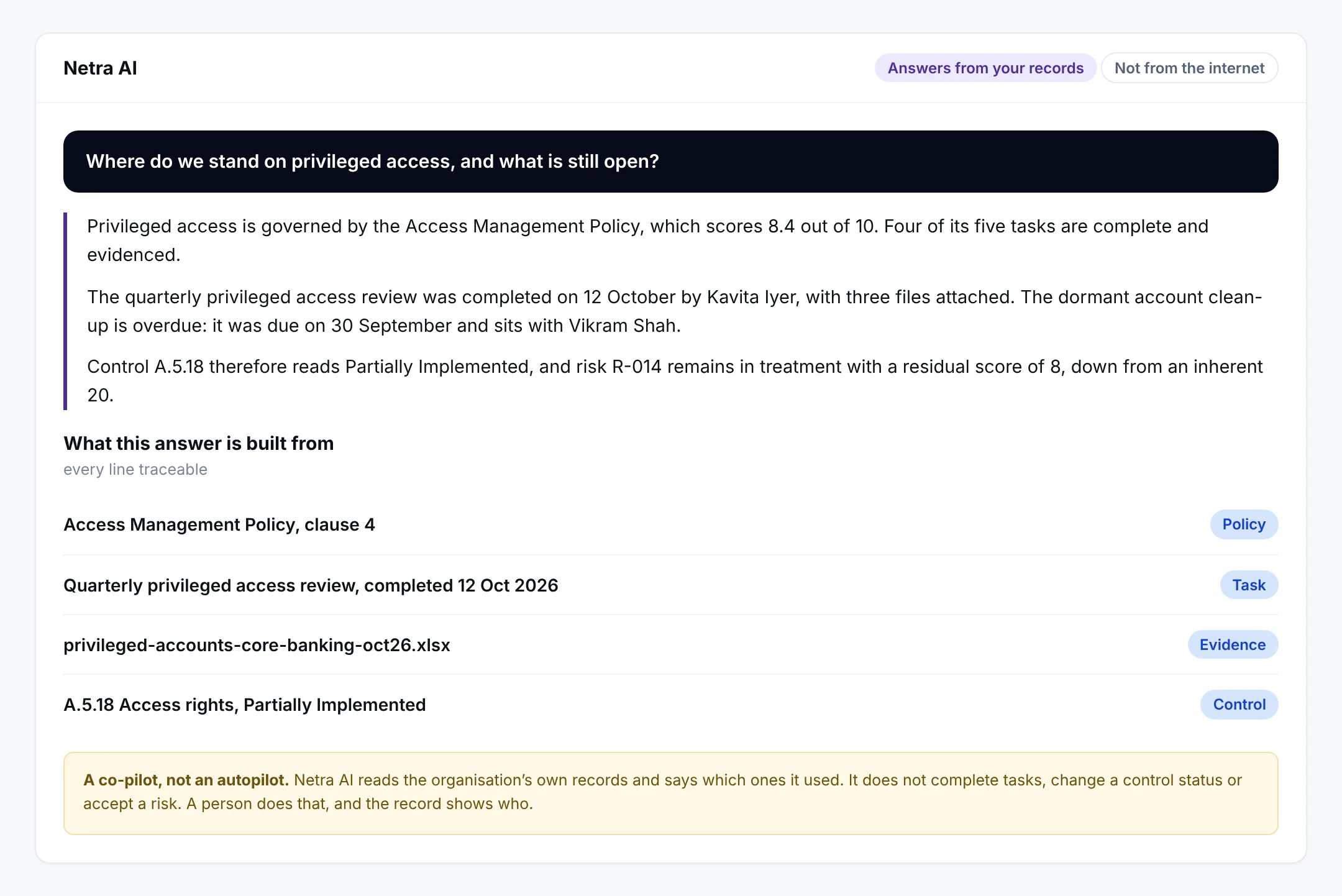
- 1A question in plain wordsNot a query language and not a filter. The person asks what they would ask a colleague.
- 2An answer with specificsDates, names, scores and control references. A general answer about privileged access would be useless; this one says what is open and who holds it.
- 3What it was built fromThe policy, the task, the evidence file and the control. Every line can be opened and checked, which is what separates this from a chatbot.
- 4A co-pilot, not an autopilotIt does not complete tasks, change a control status or accept a risk. A person does that, and the record shows who.
The answer names a policy score, a task completed on a date by a person, a task that is overdue, a control status and a risk with its residual score. Every one of those is a record in the organisation’s own tenancy, and the assistant says which ones it used.
What it is actually good at
Reading your records and proposing a link, with the reasoning attached
The clearest example is linking assets to the work that protects them. It is tedious, it is where registers go stale, and it is exactly the kind of judgment that should be proposed rather than decided.
- Netra · Netra AI · Suggesting asset links
A score you can argue with
Each suggestion carries a score, a reason in plain words and the quoted lines it was drawn from, down to the regulatory direction that requires logs to be kept for a rolling 180 days within Indian jurisdiction. Nothing is linked until a person switches it on, and the nineteen sources it read are listed so the judgment can be checked rather than trusted.
Where you meet it
The assistant is offered on the work, not in a separate window
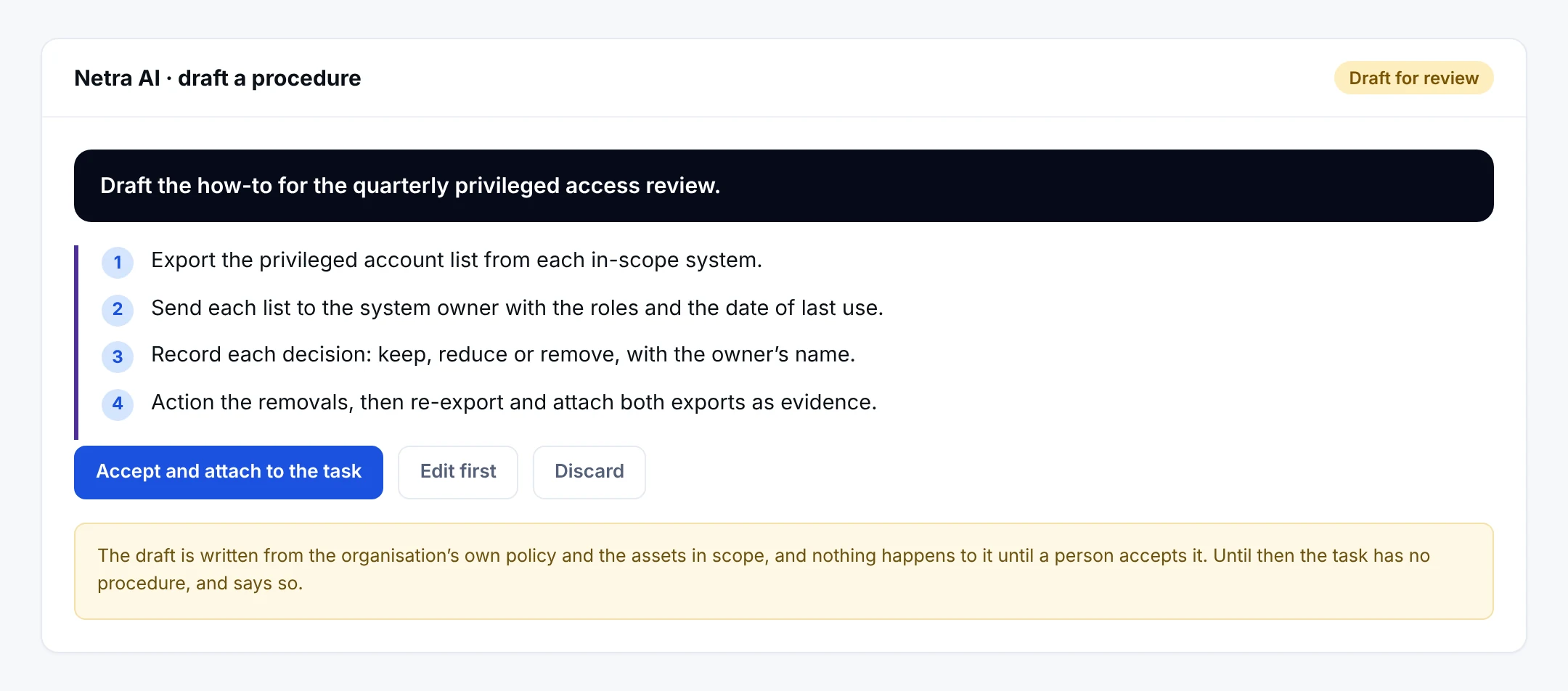
- 1Asked on the task itselfThe assistant already has the task, the policy behind it, the controls it satisfies and the risks it treats, so the question does not have to carry the context.
- 2A method, not a requirement restatedFour steps somebody can actually follow next quarter, including what to attach as evidence.
- 3Accept, edit or discardThree buttons, and the middle one is the honest default. A draft that is accepted unread is worse than no draft.
The person who has to do the task is the person who needs the help. The draft is written from the organisation’s own policy and the assets in scope, and nothing happens to it until somebody accepts it. Until then the task has no procedure, and says so.
What Netra AI does, and what your people still do
- Telling you what evidence a control needs
- Pointing out what is still missing on a task
- Drafting SOPs for your team to review
- Suggesting which assets link to which tasks
- Complete the work and upload the evidence
- Approve policies, risk treatments and vendor decisions
- Run and sign off audits
- Stay accountable for compliance status
What else is in Netra AI
Workspace built at onboarding
Netra AI builds your starting programme from the onboarding questionnaire.
Asset-to-task suggestions
Links proposed, then confirmed by a person.
SOP drafting
Drafts that your team edits and approves.
Evidence guidance
What each control needs, in plain words.
Verification reminder
On every answer, because it can make mistakes.
Tenant isolation
A hard boundary, not a preference.
Works on the same record as
A task completed anywhere in Netra shows up here. Nothing is collected twice.
Built for
Questions about Netra AI
Does Netra AI change our compliance status?
No. Netra AI advises and drafts; you review and confirm. It does not change task status, evidence or compliance status on its own. A person stays accountable, which matters for anything an auditor will see.
How is Netra AI different from a general chat assistant?
It works from your organisation's own records: your controls, tasks, risks, evidence and assets. A general assistant can explain compliance in general. Netra AI can tell you what evidence your MFA control still needs and which of your assets a task applies to.
Can Netra AI see other organisations' data?
No. Netra AI works only within your organisation's boundary. Your compliance data, risk records and conversations are never shared with or visible to other organisations.
Should we rely on Netra AI answers for an audit?
Use it to move faster, but verify important information before you rely on it. Netra AI reminds users to do this, and a person always makes the final decision.
See Netra AI on your own frameworks
A demo with your frameworks and your kind of organisation, not a generic tour.
Next module: Partner Portal