Where the work gets done.
Credited everywhere it applies.
Framework requirements arrive as concrete tasks with an owner and a due date. Your team works through actions, not control text, and every completed task counts towards each framework, policy and risk it touches.
Task Engine · one task, credited everywhere
Not started
In progress
In review
Done
Enforce MFA for remote access
Owner: IT Security
Evidence uploaded once. Credited to:
- Owned
- Every task has an owner and a due date
- Satisfies
- Each task shows every framework control it serves
- Recurring
- Repeating tasks reopen on schedule
- Linked
- To its policy, the risks it treats and its evidence
One task, from assignment to every framework it serves
The task is the single record. Everything else in Netra reads from it.
- 1
Requirement becomes a task
Generated for the frameworks you selected at onboarding.
- 2
Owner and due date
Assigned to a person, with a priority and a plan.
- 3
Work and evidence
Done once, with the proof attached to the task.
- 4
Done, or N/A
Done counts towards scores; N/A removes what does not apply.
- 5
Everything updates
Controls, policy score, risk and audit evidence move together.
The register
The whole programme as a list of owned work
Every task in one register, with the columns a compliance lead actually manages by: policy, status, priority, owner, plan, due date and evidence.
- Status from Not started through In progress and Review to Done, or Deferred
- Priority from Critical to Low, so the right work goes first
- My Overdue Tasks for each person, and a register you can search, filter and export
- Each task names the policy it sits under
One task, every framework
One task, credited to every framework it serves
The "Satisfies" line on each task shows every framework control it counts towards. Upload the evidence once and it is credited everywhere.
- One upload counts for ISO 27001, SOC 2 and the RBI Directions where the same control applies
- The task links to its policy and to the risks it treats
- SOPs and company notes sit on the task, so the next person knows how it is done
Example: one task, many credits
Recurring and evidenced
Obligations that come round again do not lapse
Quarterly reviews, annual tests and other repeating obligations are set to repeat, so they reopen on schedule and the evidence stays current.
- Set any task to repeat from the register
- Evidence is viewable on every task, for reviewers and auditors
- Group work into plans, such as a mid-term remediation plan
Obligations that repeat
The work itself
Every task knows the policy it serves and the proof it needs
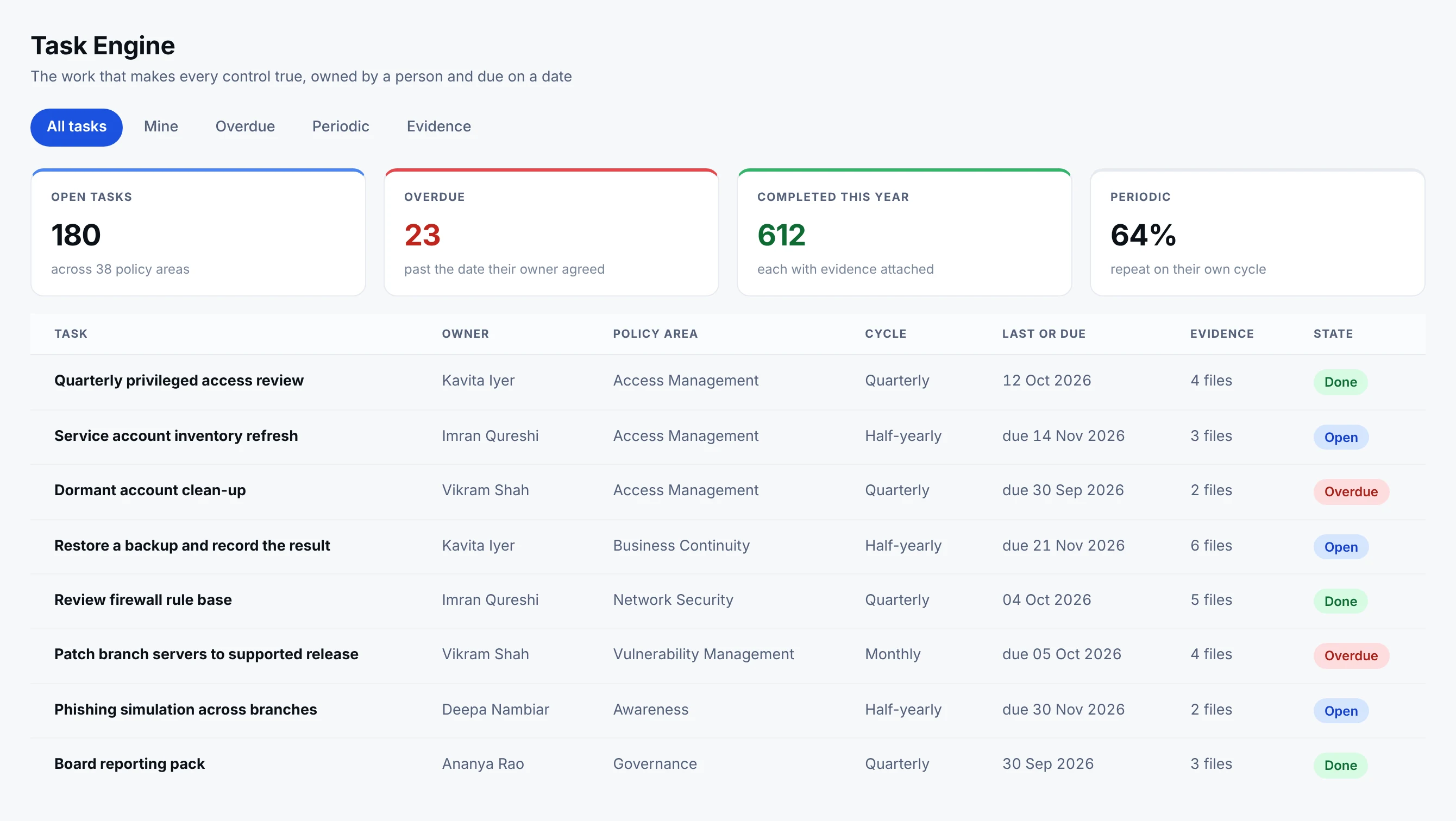
- 1Overdue is a person, not a percentageTwenty-three tasks are past the date their owner agreed. Each one has a name beside it, so the conversation is with somebody rather than about a number.
- 2A named ownerWork sits with a person, not with a department. That is what makes a cycle survive a reorganisation.
- 3The policy it servesEvery task traces back to the policy that required it, and through that policy to every framework control the work satisfies.
- 4Evidence on the taskProof is attached to the work as it is done, which is why control status can be derived rather than declared.
This is where compliance stops being a document exercise. Each row is a piece of work with a person against it.
What the task protects
A task without assets is a sentence; with them it is scope
Every task can be linked to the individual assets it protects, and Netra AI proposes which ones from the task’s own requirement and the control behind it. That link is what gives the organisation a risk profile per asset, and what lets the evidence a particular system needs be asked for against that system rather than against the task in general.
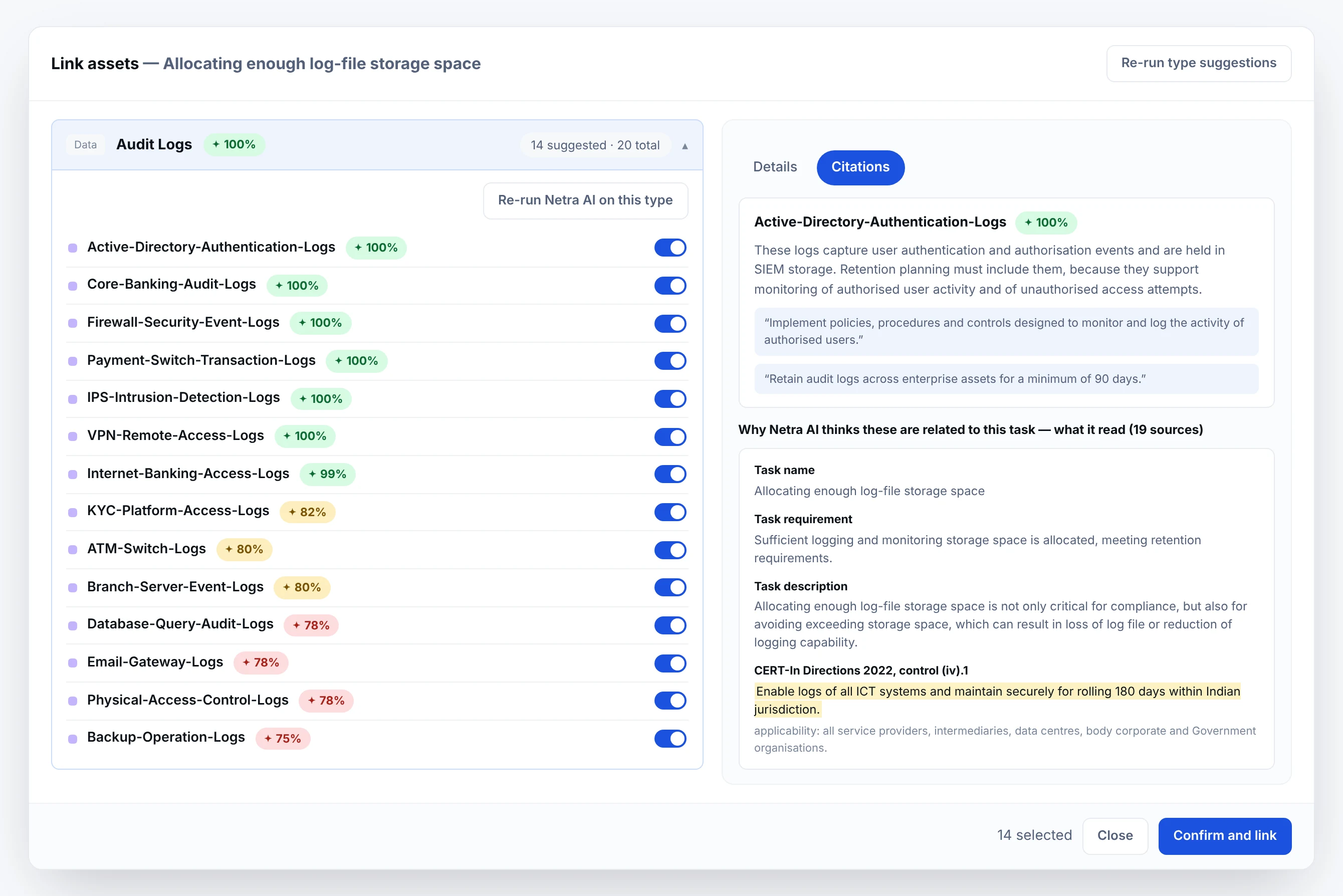
- 1One switch per assetNot a category tick. Each system is linked on its own, which is what makes per-asset evidence and a per-asset risk profile possible at all.
- 2A score you can disagree withSeventy-eight per cent is a proposal, not a decision. The ones that do not belong are left off, and the task records what was linked and by whom.
- 3With the reason attachedWhy this asset, in plain words, with the lines it was drawn from: the task requirement, the control, and the regulatory direction behind it.
The core banking audit logs and the branch server logs both sit under one task, and each can carry its own evidence and its own weight in the risk register. Netra AI scores each one and shows what it read; the person doing the work switches on the ones that apply. Fourteen of twenty here, and the six it got wrong stay off.
One task, many obligations
The same piece of work, credited everywhere it counts
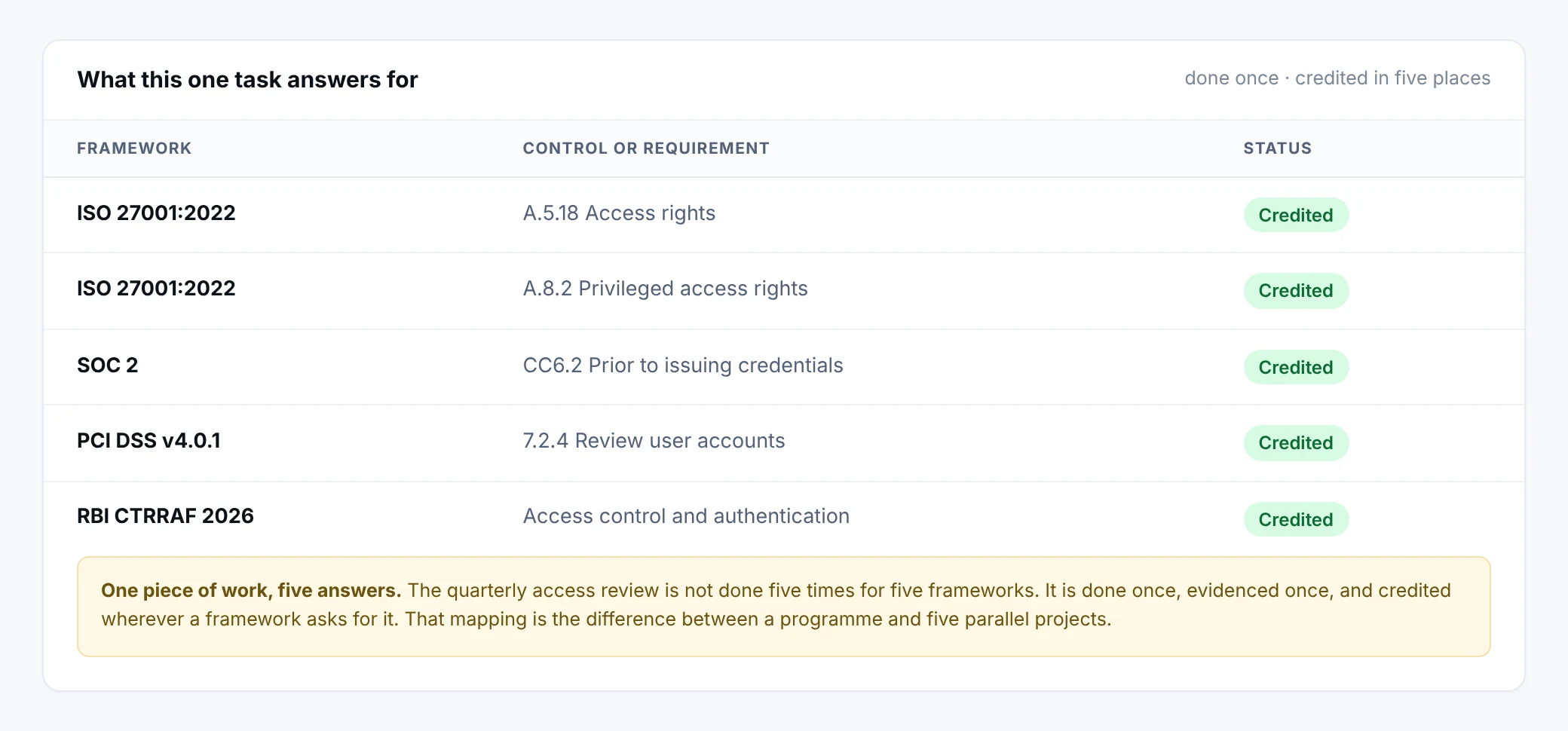
- 1The clause, not just the frameworkA.5.18, CC6.2, 7.2.4. A reader can match each line against their own copy of the standard rather than taking the mapping on trust.
- 2The Indian directions sit in the same listRBI CTRRAF is credited beside ISO and SOC 2, because to the person doing the work it is one review, not an Indian one and a global one.
This is what connected compliance means in practice. One task, carried out once and evidenced once, answering an obligation in every framework that asks for it. The alternative is the same review done four times because four auditors asked for it separately.
The proof
Evidence attached to the work, kept where you choose
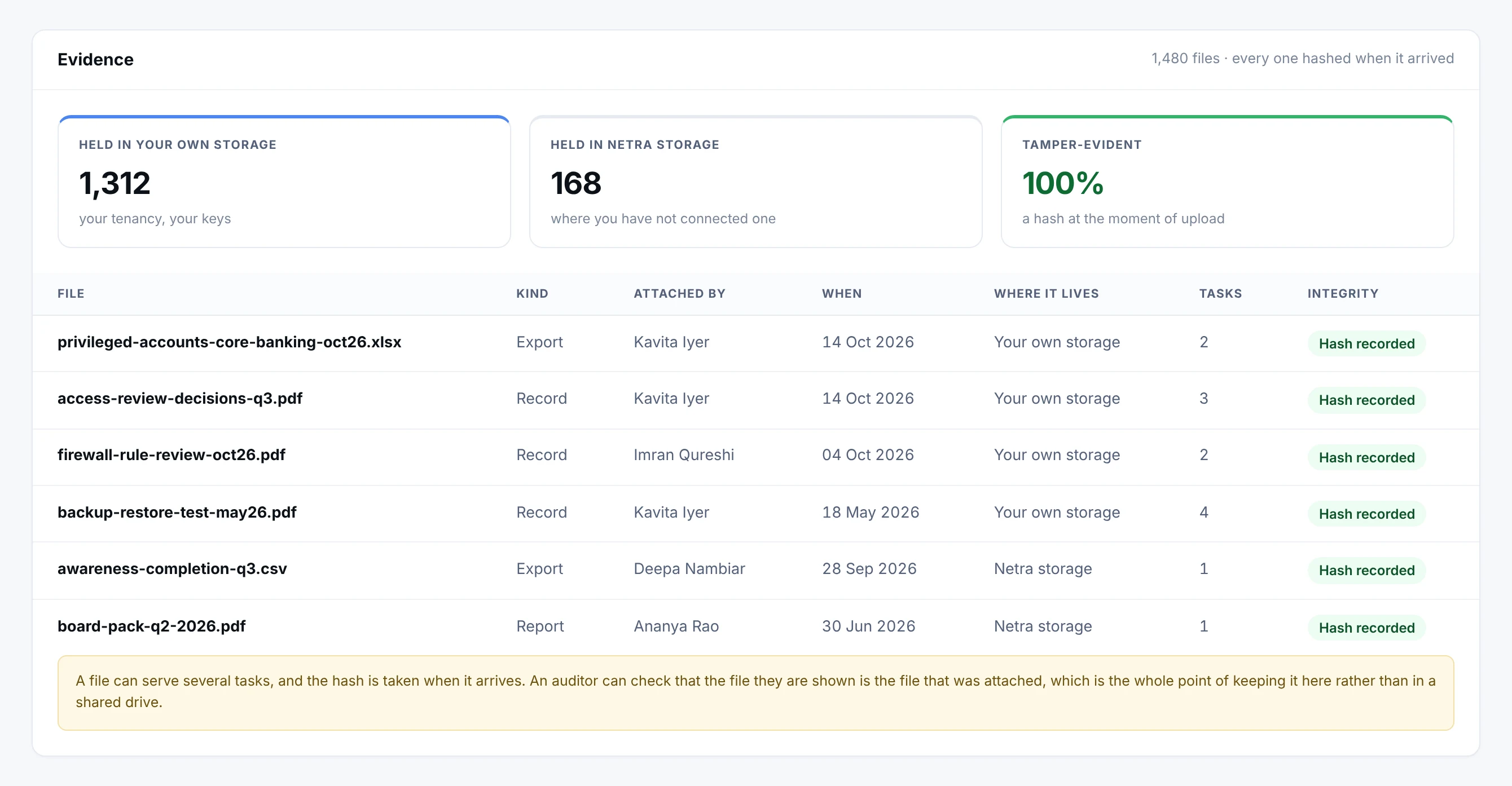
- 1Your storage, or oursMicrosoft Azure, Amazon S3, Google Drive or Microsoft OneDrive. Where an organisation has connected its own, the file never leaves its tenancy.
- 2Tamper-evident by defaultA hash is taken at the moment of upload. Nothing depends on trusting that the file was not swapped afterwards.
- 3One file, several tasksThe same export can serve the access review and the privileged access control. It is held once and credited in each place it belongs.
Evidence belongs to the work that produced it, not to a folder somebody has to remember. Most of it sits in the organisation’s own storage, because a regulated entity that cannot let evidence leave its tenancy keeps it in its tenancy. Every file is hashed as it arrives, so an auditor can check that the file they are shown is the file that was attached.
Inside a task
Everything a person needs, on one record
Open any task and the requirement, the method, the proof and the consequences are all in one place. Nobody has to ask which policy it belongs to or where the evidence went.
Also on the task
- 1Name and policyWhat has to be done, and the policy it puts into practice.
- 2OwnerAssigned to a named person from your team, or visibly unassigned.
- 3Priority and statusCritical to Low, and Not started through to Done.
- 4Plan and due dateGrouped into a plan, with a date the owner can see.
- 5Description and requirementThe requirement in plain words, and how to do it.
- 6Linked assetsThe systems the task was performed on.
- 7EvidenceThe proof, attached once and credited wherever it applies.
- 8Risk, analysis and mitigationThe risks the task treats, and what it does about them.
The life of a task
Status moves as the work moves. Only completed work counts.
- 1
Not started
Assigned, waiting for its owner.
- 2
In progress
Being worked, with evidence added as it is produced.
- 3
In review
Checked by a reviewer before it is closed.
- 4
Done
Counts towards every control, policy and risk it serves.
A task can also be deferred, or marked N/A when it genuinely does not apply. Either way the decision stays on record.
Finding the work
The right task, in a few clicks
A programme can run to hundreds of tasks. The register is built to be sorted, not scrolled.
Overdue
Overdue work, counted and filtered, for the team and for each person.
Waiting
Tasks waiting on someone else, separated from your own.
Priority
Critical first, so the right work goes first.
Status
Not started, in progress, in review, done or deferred.
Owner
Everyone on the team, including tasks still unassigned.
Plan and due date
By remediation plan, or by when it is due.
The Task Engine in numbers
- 4 stages
- Not started, in progress, in review and done
- 6 cycles
- Repeat daily, weekly, monthly, quarterly, half-yearly or yearly
- 4 stores
- Evidence can be kept in Azure, Amazon S3, Google Drive or OneDrive
- 1 record
- One task, read by every module in Netra
Why it matters
The same compliance work, done once
Most programmes track one control in many places. Netra tracks one task.
The usual way
- The same control tracked separately for each framework
- Evidence emailed, renamed and uploaded again for every audit
- Owners and due dates kept in individual inboxes
- Status typed in by whoever remembers
In Netra
- One task per piece of work, credited to every framework it serves
- Evidence attached once and reused at audit time
- Every task has an owner, a due date and a repeat cycle
- Status derived from work that was completed
Who works in it, and what stays on record
What else is in Task Engine
N/A when it truly does not apply
Removes a task from scoring without hiding that the decision was made.
SOPs and notes
Keep the how-to with the task, not in someone's inbox.
Help from Netra AI
Explains what evidence a task needs and suggests which assets it applies to.
Overdue at a glance
Each person sees their own overdue work first.
Export the register
Take the task list out for a committee or an auditor.
Linked to assets
Know which systems each task was performed on.
Works on the same record as
A task completed anywhere in Netra shows up here. Nothing is collected twice.
Questions about Task Engine
How can one task satisfy several frameworks?
Frameworks overlap heavily. The same control, for example multi-factor authentication, appears in ISO 27001, SOC 2, NIST CSF and others. Netra maps each task to every framework control it satisfies, so completing it advances all of them at once. Each task shows exactly which frameworks it satisfies.
Do we need to upload evidence again for an audit?
No. Evidence attached to a task while doing the work flows into the audit, so you never assemble it twice. The audit does not start from a blank page.
Do we have to build our policies, controls and tasks from scratch?
No. When your workspace is created, Netra AI generates your policies, controls, tasks and risks from the frameworks you choose. You start from a populated programme and work it, rather than writing it.
Can I create my own tasks?
Tasks are generated for your organisation from your enabled frameworks and policies, so your programme stays aligned to the standards it maps to. Your work is in completing them - assigning owners, updating status, attaching evidence, and setting recurring ones to repeat.
How can one task satisfy several frameworks?
Frameworks overlap heavily - the same control (e.g. multi-factor authentication) appears in ISO 27001, SOC 2, NIST CSF and others. Netra maps each task to every framework control it satisfies, so completing it advances all of them at once. The "satisfies →" line on the task shows exactly which.
What's the difference between Done and N/A?
Done means completed - it counts toward your scores. N/A means the task genuinely doesn't apply to your organisation - it's removed from the score calculation entirely, so it neither helps nor hurts. Use N/A honestly; don't mark a task N/A just to lift a score.
A task keeps reopening. Why?
It's set to repeat. Recurring obligations (like quarterly reviews) reopen automatically each cycle so they don't lapse. Open the task and use the repeat controls in the Details panel to change the frequency or turn repeat off. You can view its full repeat history there too.
Do I need to re-upload task evidence into audits?
No. Evidence attached to a task can be pulled directly into an audit's Evidence Vault, so the proof you capture while doing the work is reused at audit time rather than gathered again.
How do I know which assets a task applies to?
Ask Netra AI. There's no fixed task-to-asset mapping because it varies by organisation, so Netra AI suggests the relevant assets from your register using each asset's type-specific details. Knowing the exact assets tells you where to act and what evidence to collect. See Asset Management.
See Task Engine on your own frameworks
A demo with your frameworks and your kind of organisation, not a generic tour.
Next module: Compliance Centre