Your cloud estate,
collected, checked and traced.
Connect your cloud accounts and Netra keeps the inventory, its security posture and its evidence current. Every check is traced to the control it evidences, the task that fixes it and the risk it carries.
Cloud Management · collect, check, trace
Cloud account A
Resources 0
Security checks 0
Cloud account B
Resources 0
Security checks 0
Illustration. Figures are examples, not client data.
- Scheduled
- Collection runs automatically, or when you ask
- Traced
- From a cloud check to a control, a task and a risk
- Your store
- Evidence can be kept in your own cloud storage
- Per framework
- Cloud checks mapped to the controls they evidence
From a connected account to a defensible control
Each step is recorded, so what the cloud tells you can stand in front of an auditor.
- 1
Connect
Cloud accounts linked through integrations.
- 2
Collect
Resources gathered on a schedule or on demand.
- 3
Check
Configuration assessed against security policies.
- 4
Map
Results counted as evidence for framework controls.
- 5
Fix
Failures become tasks and, where needed, risks.
Monitoring
Posture, coverage and health in one view
The monitoring view answers the questions a security lead asks first: how many accounts are connected, how many checks passed, what failed, and whether collection is working.
- Overall posture, with findings by severity
- Coverage and operations: accounts, checks, passed checks and configuration changes
- Health for each connected cloud, and for each collection run
- A running record of recent activity
What the monitoring view reports
Traceability
From a cloud check to the work that fixes it
Evidence, task and risk sit on one chain. A failed check is not a line in a report; it is a piece of work with an owner.
- Evidence collected, and evidence still requiring a task
- Open remediation tasks, and tasks awaiting verification
- Risks created from cloud findings through the same chain
One chain, three records
Evidence
Evidence you keep where you choose
Collected evidence can sit in your own cloud storage or document vault. Netra keeps the inventory and the metadata, and the files stay where your organisation wants them.
- Evidence folders and files browsable inside Netra
- Automatic collection, or a collection on demand
- The same storage choice you make for task evidence
Your storage, your choice
What it is watching
Coverage you can count, not a green tick
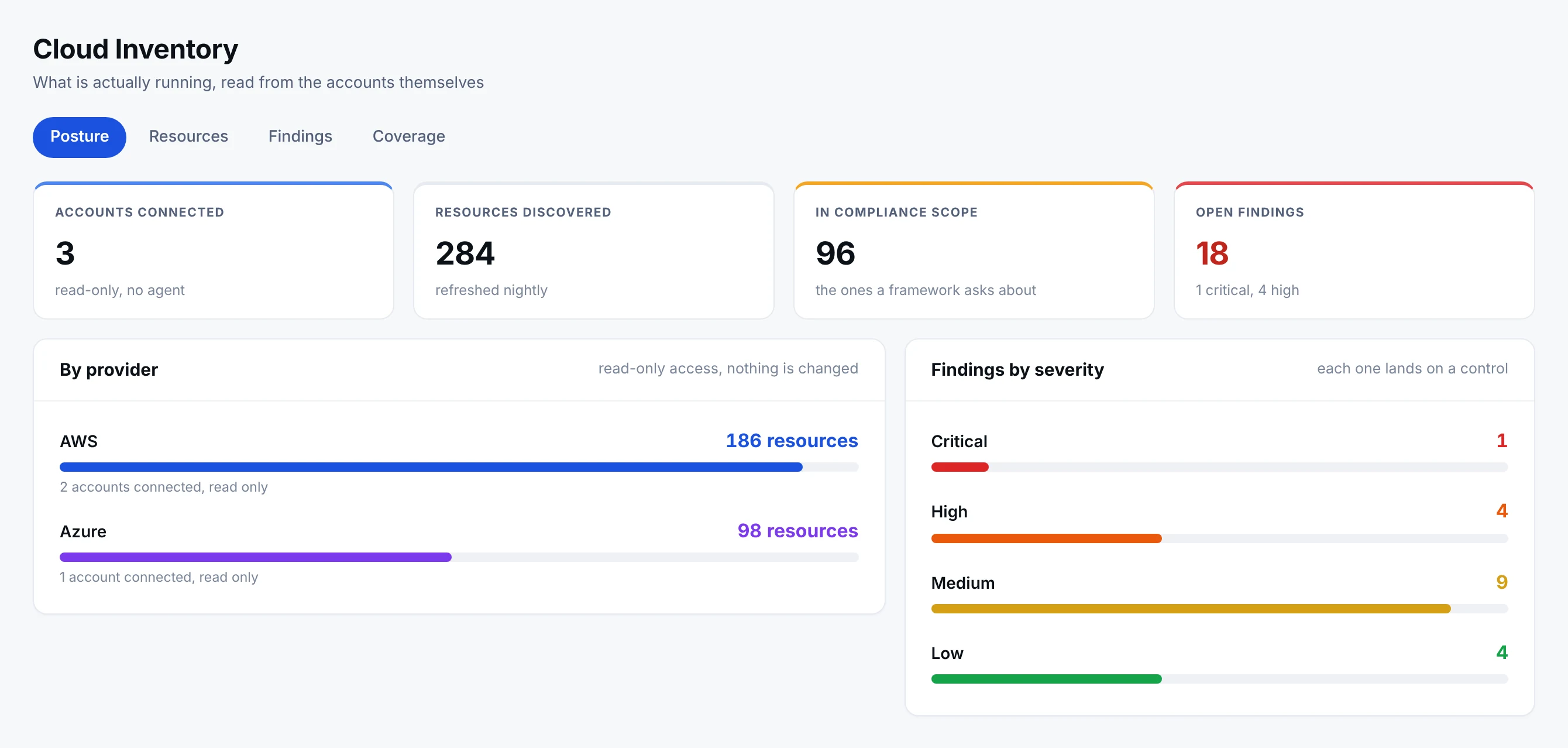
- 1In scope is the number that mattersTwo hundred and eighty-four resources were found; ninety-six of them are what a framework asks about. Reporting on the first number flatters the programme and helps nobody.
- 2Read-only, and no agentNetra reads the accounts. It does not change them, and nothing is installed inside them.
- 3By providerAWS and Azure side by side, because an estate that spans two providers is one estate to the person answering for it.
Accounts connected, resources discovered, how many of them a framework actually asks about, and what is open against them. A number nobody can open is a number nobody should trust.
Cloud Management in numbers
- 5 views
- Monitoring, assets, security policies, compliance and evidence
- 4 stores
- For collected evidence: Azure, S3, Google Drive, OneDrive
- 1 chain
- Evidence to task to risk, from every check
- Every run
- Recorded, with what changed and what failed
Why it matters
Cloud compliance without the screenshots
Configuration evidence should be collected, not captured by hand before an audit.
The usual way
- Screenshots of cloud consoles taken before every audit
- No record of what changed between audits
- Cloud findings tracked apart from the compliance programme
In Netra
- Resources and configuration collected on a schedule
- A history of changes and collection runs
- Findings that become tasks, evidence and, where needed, risks
Where it sits in Netra and who uses it
Cloud Management
Monitoring, assets and compliance from your connected clouds
Each tab reads from the same collection run, so the posture, the inventory and the controls agree with each other.
Also included
What else is in Cloud Management
Collect now
A fresh collection whenever you need one.
Scheduled collection
Automatic runs, each recorded.
Change history
What changed, and when.
Security policies
Passed, failed and warning checks with severity.
Linked to assets
Discovered resources join the asset register.
Cloud connections
Managed through integrations.
Works on the same record as
A cloud finding is traced through the same record as every other piece of compliance work.
Built for
Questions about Cloud Management
What does Cloud Management do?
It connects to your cloud accounts, collects the resources in them, checks their configuration against security policies and keeps the results on the same record as your tasks, controls and risks. The inventory, the posture and the evidence always agree with each other.
Does cloud evidence replace the work my team does?
No. Automated checks cover what can be read from the cloud configuration. Controls that need people, such as approvals, reviews and training, still go through tasks and evidence. Netra shows which controls have a cloud check and which do not.
Can we choose where collected evidence is kept?
Yes. Evidence can be saved to your own cloud storage or document vault, so the files stay where your organisation wants them.
How often is the cloud estate collected?
Collection can run automatically on a schedule, or on demand when you need a fresh picture. Each run is recorded, so you can see what was collected, what changed and what could not be read.
What happens when a cloud check fails?
The finding is recorded against the resource and the control it affects, and can be traced to a task and a risk, so it is worked like any other piece of compliance work.
See Cloud Management on your own frameworks
A demo with your frameworks and your kind of organisation, not a generic tour.
Next module: Dashboard & Reports