Control status you cannot fake.
It is derived from the work.
Every framework you run gets its own live view: an overview for leadership and a control register for the people doing the work. Status comes from completed tasks and evidence, never from someone typing "Implemented".
Compliance Centre · status derived from the work
12
- ISO 27001:202234%
- SOC 228%
- NIST CSF 2.022%
- RBI CTRRAF 202618%
- GDPR30%
Illustration of how status moves. Not client data.
- 50+ frameworks
- Including all seven RBI CTRRAF 2026 Directions
- Derived
- Status worked out from tasks and evidence
- Per framework
- An overview and a control register for each
- One click
- To the framework report for the board
How a control gets its status
Nobody sets a control to Implemented. The work does.
- 1
Frameworks selected
Chosen at onboarding; more can be added later.
- 2
Controls mapped to tasks
Each control is served by one or more tasks.
- 3
Work done once
A completed task counts for every control it serves.
- 4
Status derived
Implemented, partial, not implemented or out of scope.
- 5
Posture and report
Live per framework, with a one-click report.
A control becomes Out of Scope only when every task mapped to it genuinely does not apply.
Controls
The working register, control by control
Switch between frameworks with the tabs along the top. Each control opens to its tasks, policies and evidence, so a gap is one click from the work that closes it.
- A status for every control, worked out from the tasks behind it
- Search and filter the register for the controls you are working on
- Related open tasks and the framework report sit at the top of every view
Overview
Each framework, in its own structure
The overview reads each framework the way its own text is organised: GDPR by chapter and section, ISO 27001 by domain and control type, so an auditor recognises what they see.
- Control status split into implemented, partial, not implemented and out of scope
- Breakdowns by the categories that framework uses
- Percentages that move as tasks are completed, never edited by hand
One framework, its own structure
Cloud checks
Cloud configuration checks, mapped to controls
Where cloud accounts are connected, automated checks are mapped to the framework controls they evidence, alongside the controls that still need people to do the work.
- Controls in cloud scope shown separately from those with no cloud check
- Last collection and last evaluation dates on the page
- The same frameworks as your Compliance Centre, from the same record
Cloud checks, mapped to controls
Where a framework stands
Control status derived from the work, not declared in a meeting
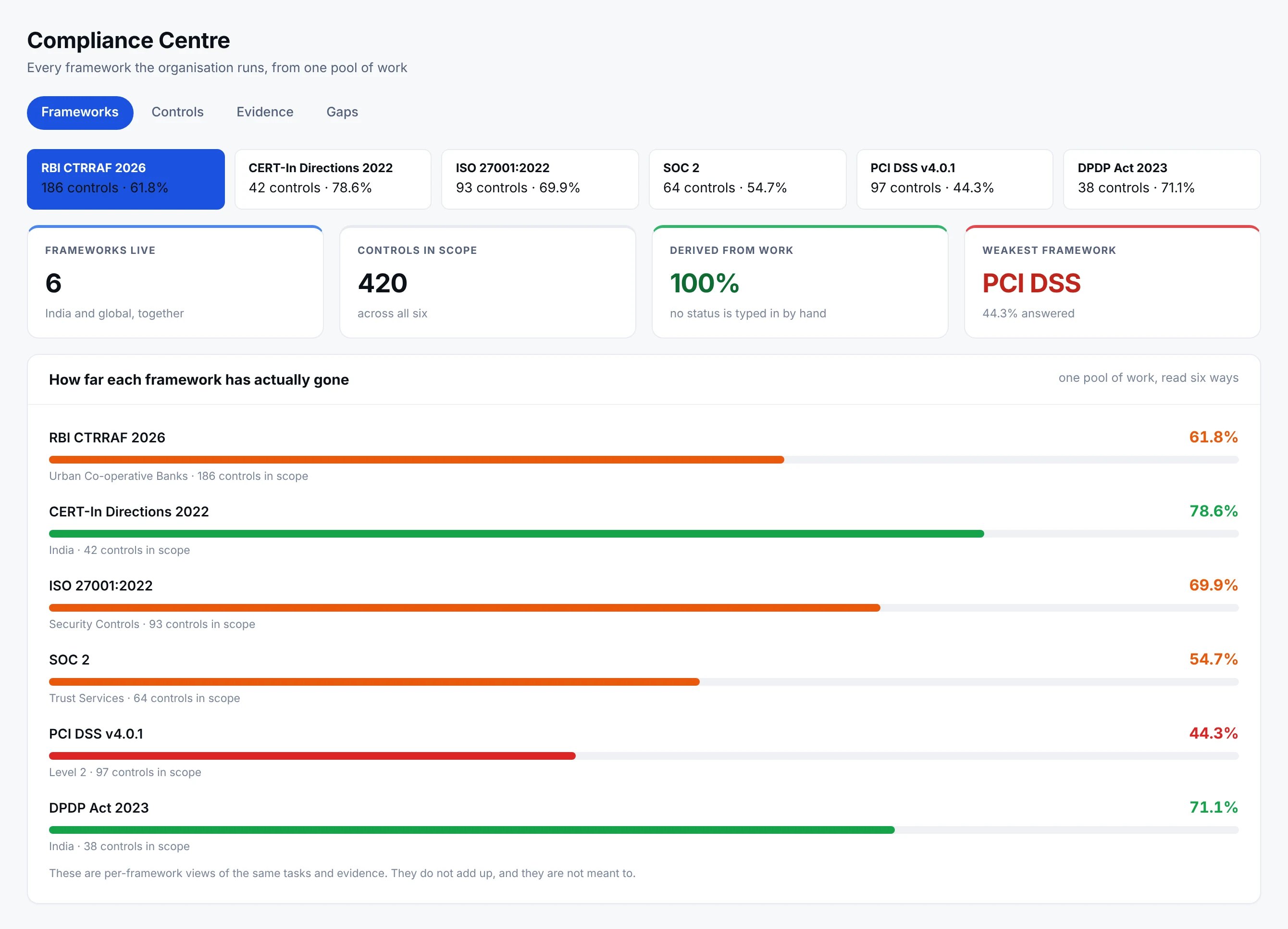
- 1Derived, never declaredEvery status on this page is computed from completed, evidenced work. There is no field anywhere in Netra for typing a control into the implemented column.
- 2India and global, side by sideRBI CTRRAF and CERT-In sit in the same list as ISO 27001, SOC 2, PCI DSS and the DPDP Act, because the organisation runs them together.
- 3The weakest one is namedForty-four per cent on PCI DSS is not a failure of the programme. It is the share of that framework the completed work has answered so far.
Each bar moves when tasks are completed and evidence is attached. Nobody can type a control into the implemented column, which is why these figures survive a question in a board meeting.
Control by control
Every control, with the status it has earned
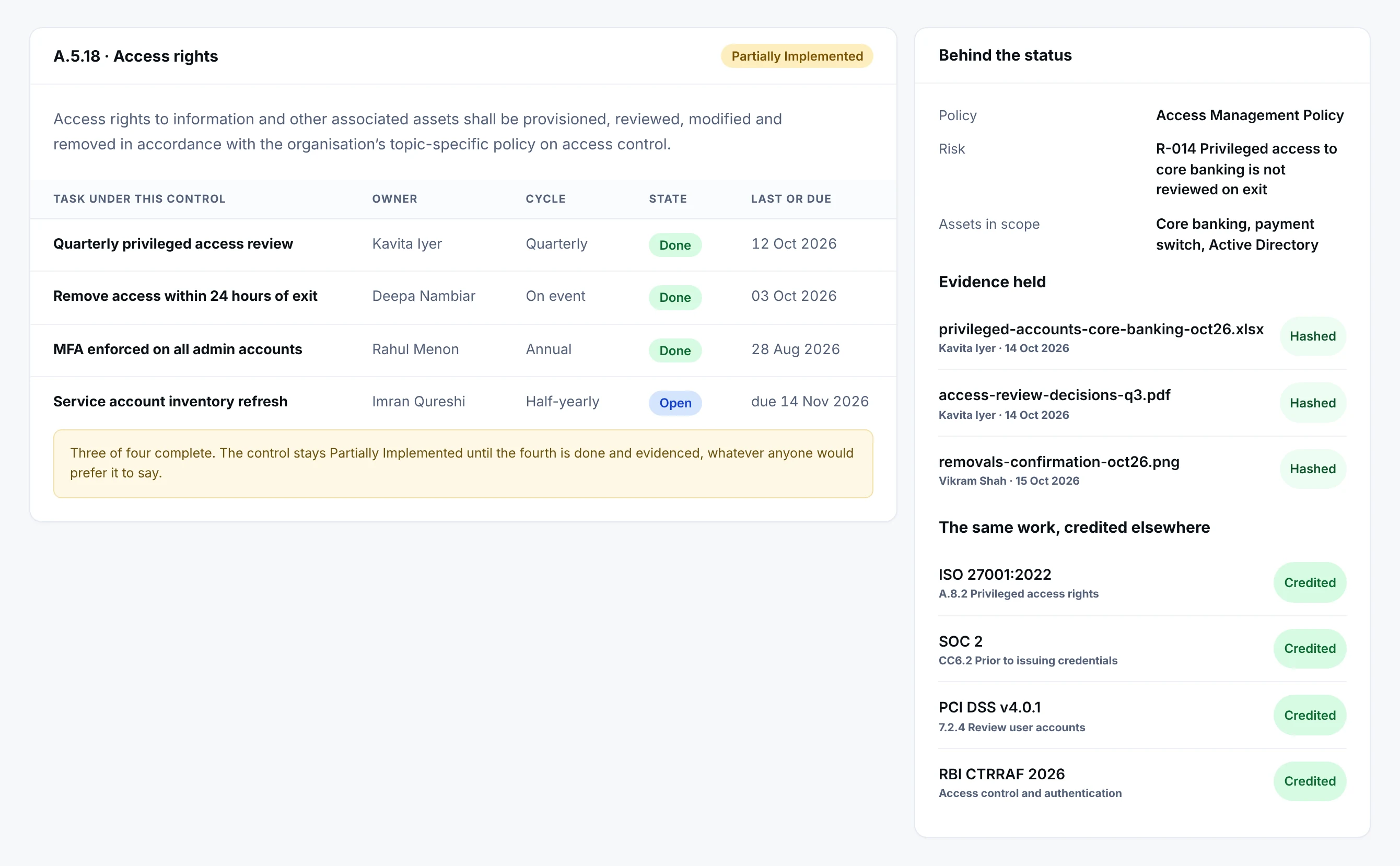
- 1The tasks are the controlNot a description of what should happen. The named work, on a cycle, with a person against each line.
- 2What it touchesThe policy it falls under, the risk it treats and the assets in scope. A control that touches nothing is a paragraph.
- 3Evidence, hashed on arrivalThe files an auditor will ask for, held against the control, each with the hash taken when it was attached.
- 4Credited elsewhere, automaticallyThe same completed work answers SOC 2, PCI DSS and the RBI directions. It is done once and counted wherever it applies.
The clause as the standard writes it, the tasks that carry it, the person who owns each one, the evidence attached, and the other frameworks that same work answers for. Three of four tasks are complete, so the control reads Partially Implemented and will keep reading that until the fourth is done.
What is missing
A gap list that says why each one is open
A gap in Netra is not a judgement. It is a control with no completed, evidenced work under it, and the row names the piece of work that is missing and the person who holds it.
- Netra · Compliance Centre · Gaps
Ordered by what the gap costs you
Log retention is first because three frameworks ask about it. The reason beside each row is the useful part: a control with no task under it is a different problem from a task that is simply late, and they go to different people.
The framework report
A report your board and your auditor can both read
Every framework has a one-click report, generated from live data. This is how a HIPAA security report is laid out, shown with demo data.
- 1Cover and contentsOrganisation, framework and the date it was generated.
- 2Executive summaryOverall compliance and control status on one page.
- 3Control-type performanceHow controls perform by type, so the weak category stands out.
- 4Posture trendCompliance posture over time.
- 5Quarterly postureThe same picture, quarter by quarter.
- 6Key findingsWhat needs attention first.
In every framework
Five views, the same record
Switching framework changes what you see, not where the data comes from.
Overview
Control status, in the framework's own structure.
Controls
The register of controls, each with its derived status.
Related tasks
The open work the framework is waiting on.
Report
Generated from live data, one click.
Cloud checks
Configuration checks mapped to the controls they evidence.
The Compliance Centre in numbers
- 50+
- Frameworks supported, including India-specific Directions
- 4 states
- Implemented, partial, not implemented, out of scope
- 7 sections
- In every framework report, from summary to sign-off
- 1 click
- From a framework to a report ready for the board
The report ends with a plan, not just a score
Open work is grouped into three horizons by priority, so the board sees what happens first.
- 1
Immediate
0 to 30 days: the gaps that cannot wait.
- 2
Short term
31 to 90 days: the next block of planned work.
- 3
Medium term
91 to 180 days: the longer remediation.
- 4
Sign-off
Prepared, reviewed and approved, with an attestation.
Why it matters
Status you can defend
A control marked Implemented should mean something an auditor can follow.
The usual way
- Control status typed in by an owner
- A separate tracker for every framework
- A board report assembled by hand each quarter
- Gaps found when the audit starts
In Netra
- Status derived from completed tasks and evidence
- One programme, with each framework scored on its own
- The report generated from live data
- Gaps visible every day, with the task that closes each one
Who uses it and where it connects
What else is in Compliance Centre
A tab for every framework
ISO 27001, SOC 2, NIST CSF, GDPR, the RBI Directions and the rest of your programme.
Add frameworks later
Work already done counts towards a framework added after onboarding.
Control detail
Open any control to its tasks, policies and evidence.
Out of scope, properly
Only when every mapped task genuinely does not apply.
Related open tasks
Jump from a framework straight to the work it is waiting on.
Framework report
The board report for that framework, from live data.
Works on the same record as
A task completed anywhere in Netra shows up here. Nothing is collected twice.
Questions about Compliance Centre
Which frameworks does Netra support?
Netra's framework library holds 50+ frameworks. For India it includes the RBI CTRRAF 2026 Directions for each class of regulated entity, NISPG 2019 v5.0 and the CERT-IN guidelines, alongside ISO 27001:2022, SOC 2, NIST CSF, GDPR, PCI DSS, HIPAA, DORA and NIS2. The Framework Library lists every framework, and the Framework Selector suggests the ones relevant to you.
How can one task satisfy several frameworks?
Frameworks overlap heavily. The same control, for example multi-factor authentication, appears in ISO 27001, SOC 2, NIST CSF and others. Netra maps each task to every framework control it satisfies, so completing it advances all of them at once. Each task shows exactly which frameworks it satisfies.
Can we add more frameworks after onboarding?
Yes. Your organisation's administrator can add frameworks after onboarding. The new framework's controls, tasks and policies are generated into your workspace, and work you have already done counts towards it wherever the same control applies.
Does using Netra make us certified or compliant?
No tool can certify you. Certification and regulatory sign-off come from your auditor, certification body or regulator. Netra organises the work, evidence and audit records so that you can show them what has been done.
Why can't I set a control's status directly?
Because a control's status should reflect reality, not assertion. Netra derives it from the tasks that satisfy the control - every task Done means Implemented, some progress means Partial, nothing done means Not Implemented. This keeps your posture honest and audit-defensible.
How does a control become "Out of Scope"?
Automatically - when every task mapped to the control is marked N/A in the Task Engine, meaning nothing about that control applies to your organisation. You don't set Out of Scope on the control yourself; it's the natural result of all its tasks being N/A. Mark tasks N/A only when they genuinely don't apply.
If I change a task here, does it change in the Task Engine?
Yes. There's one record per task. Changing its status or adding evidence here updates the Task Engine, and vice versa. The Compliance Centre is just the framework-focused view of the same tasks. For the fuller task toolkit (SOP, detailed evidence, risks, repeat), use the Task Engine.
Which frameworks appear here?
The ones your organisation selected during onboarding. They appear as tabs; each is scored and reported independently. Because work maps across frameworks, progress on one often advances others.
Is the board report really one click?
Yes. The [Framework] Report button assembles the full document - executive summary, risk exposure, policy impact, remediation roadmap, critical gaps, full register, and sign-off page - from live data, ready for board distribution.
See Compliance Centre on your own frameworks
A demo with your frameworks and your kind of organisation, not a generic tour.
Next module: Policy Hub