A living policy library,
not shelf-ware.
Your policy library is generated at onboarding, tailored to the frameworks you run. Each policy carries a score that shows how much of it has actually been put into practice, and it rises only as the work behind it is done.
Policy Hub · a live score on every policy
Access
Cloud Security
Incident Response
Business Continuity
Data Protection
Human Resources
Linked tasks done: 2
Illustration. Scores are out of 10 and rise with linked task completion.
- 35+
- Policy domains generated at onboarding
- Out of 10
- A live score on every policy
- Your own
- Existing policies kept alongside
- One-click export of any policy
How a policy earns its score
A policy is only as good as the work done under it, so that is what the score measures.
- 1
Onboarding questions
About 20 questions, including which frameworks apply.
- 2
Policies generated
Tailored to your organisation and frameworks.
- 3
Linked to tasks
Each policy is put into practice through tasks.
- 4
Work completed
Owners complete tasks and attach evidence.
- 5
Score rises
The policy score moves as the work is done.
The library
Every policy, and how far it has really gone
Each policy card states its purpose and its score. A low score shows a policy that exists on paper but not yet in practice, before an auditor finds it.
- Policies from access and asset management to business continuity and cloud security
- A score out of 10 on every policy, coloured so the weak ones stand out
- Search by name or description, and generate the full set in one step
Your existing policies
Keep what you already have
Upload the policies your organisation has already approved. They sit alongside the live Netra policy, so auditors can compare the two.
- Nothing you have already approved is thrown away
- SOPs and company notes are kept with each policy
- Netra AI can draft SOPs for your team to review
What each policy holds
For the board
Which policy areas are held back
The board report includes a policy coverage view: which policy areas are affected by unfinished work, how many tasks are done and open, and where to act first.
- Policy areas sorted by impact
- Done, open and total tasks for each area
- A plain-English insight for the board
Where the programme actually stands
Every policy domain, scored from the work behind it
A policy is only as good as the work done under it. The profile shows each domain at once, so the thin ones are obvious before an auditor finds them.
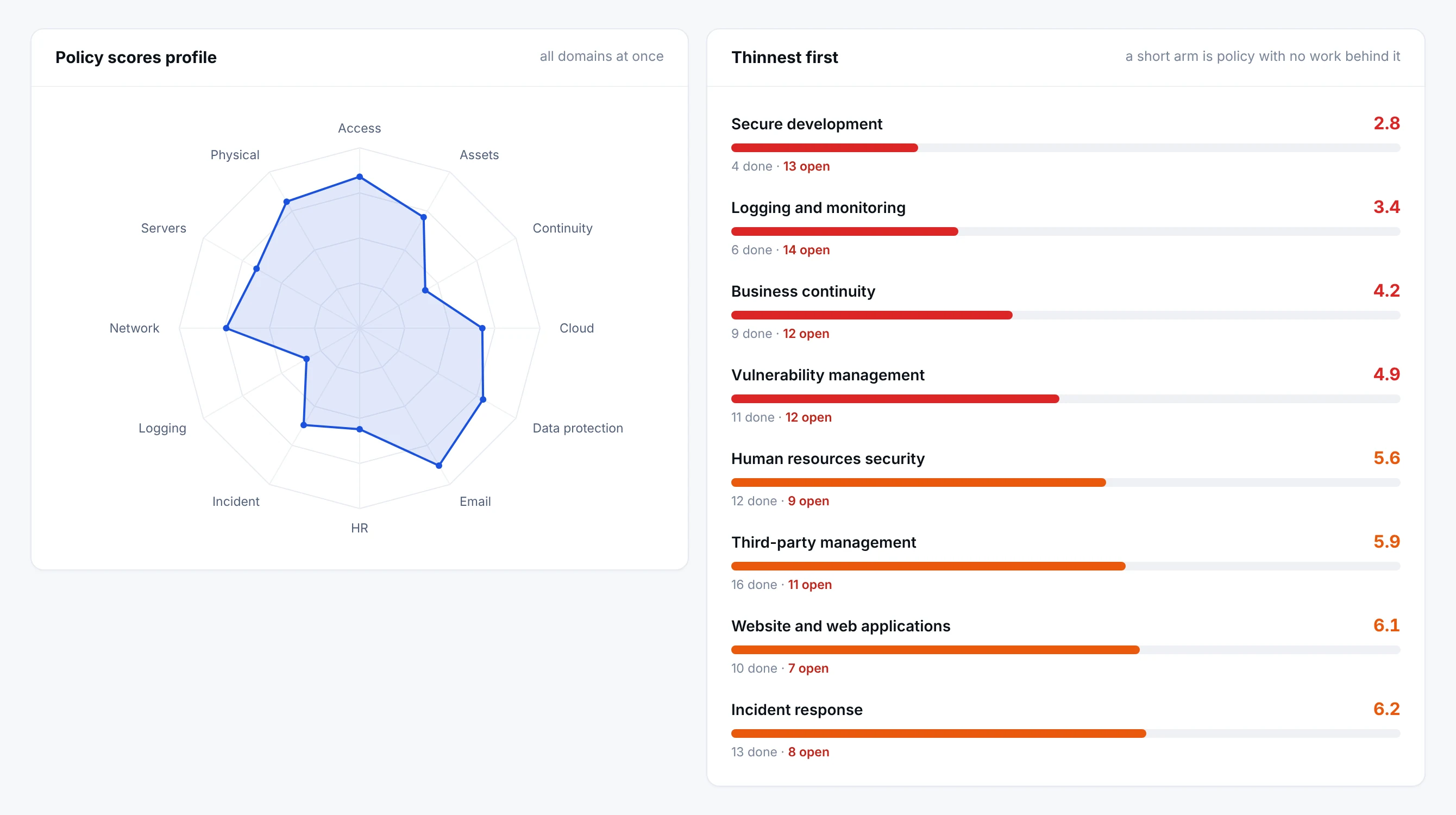
- 1Worst first, with the arithmeticSecure development scores two point eight because four tasks are done and thirteen are open. The number is the work, not a judgement somebody entered.
- 2The shape is the programmeA balanced estate is a wide, even shape. The dents are where an auditor will spend their time.
Access, cloud security, data protection, incident response, third-party management and the rest, each scored from the tasks and evidence completed under it. A short arm is a domain with policy on paper and little behind it, and the list beside it names them worst first so the conversation starts in the right place.
The library
One policy for every area an auditor will ask about
Policies are generated at onboarding for the frameworks you run, so the library covers the areas your regulators and certifiers expect.
Generated for your frameworks
Built from your onboarding answers, not a generic download.
Your own policies
Organisations can add their own policies and requirements.
Export as PDF
Any policy, ready for approval or circulation.
Generate them all
Select all and generate the full set in one step.
A sample of the policy areas
Inside a policy
A policy you can open, and the work that makes it true
Purpose, scope and the clauses an auditor reads, with the tasks that carry them beneath, and the score on the right that is nothing more than those tasks.
- Netra · Policy Hub · Access Management Policy
The what, the how, and the proof, on one record
The clauses are the policy. The table under them is how it is carried out, by name and on a cycle. The score on the right is three of five tasks complete, one open and one overdue, so a policy cannot read as strong while the work behind it is not. Your own approved version sits alongside, so an auditor can compare the two without an email thread.
Your policies, your way
Start from Netra's policy, or bring your own. Both stay on the record.
- 1
Generate
Select the policies and generate them.
- 2
Review
Your team reads and adjusts them.
- 3
Add your own
Upload approved policies alongside.
- 4
Put into practice
Tasks carry each policy out.
- 5
Export
Download any policy as a PDF.
The Policy Hub in numbers
- 35+
- Policy areas, generated for your frameworks
- Out of 10
- A live score on every policy
- 1 pack
- A policy register and a document for each policy, as a PDF
- 2 versions
- The Netra policy and your own approved version, together
Why it matters
Policies that are lived, not filed
A policy that nobody can link to the work is a document, not a control.
The usual way
- Policies kept on a shared drive and reviewed once a year
- No link between a policy and the work done under it
- Several versions in circulation
- The auditor finds the gap before you do
In Netra
- Policies generated for your frameworks at onboarding
- A live score driven by the linked tasks
- Your SOPs and company notes beside each policy
- Weak policies visible before anyone asks
The policy pack, and who it is for
What else is in Policy Hub
Generated, not templated
Built for the frameworks you selected, not a generic download.
One-click PDF
Export any policy for approval or circulation.
SOPs with the policy
The how-to lives next to the what.
Drafting help
Netra AI drafts SOPs; your team reviews and approves.
Find any policy
Search the library by name or description.
Linked to the work
Every policy shows the tasks that put it into practice.
Works on the same record as
A task completed anywhere in Netra shows up here. Nothing is collected twice.
Questions about Policy Hub
We already have policies. Can we keep them?
Yes. Upload your existing documents and they sit alongside the live Netra policy, so auditors can see what the previous version said.
Do we have to build our policies, controls and tasks from scratch?
No. When your workspace is created, Netra AI generates your policies, controls, tasks and risks from the frameworks you choose. You start from a populated programme and work it, rather than writing it.
Why can't I create or edit a policy?
Netra policies are generated and maintained centrally so they stay aligned with the frameworks they map to. Your customisation lives in the SOPs, company-specific notes, and attachments on each policy - which is exactly the layer auditors expect to be organisation-specific.
Why is one policy's score 0.0 when others are high?
A 0.0 means none of that policy's mapped tasks are Done yet. The policy's task list shows exactly what is outstanding. Scores of 0 on newly onboarded organisations are normal - they're your starting line, not a fault.
A control doesn't apply to us. Will it drag our score down forever?
No. Mark the mapped task as N/A - it is excluded from the score calculation entirely. Your score reflects only what genuinely applies to your organisation.
Can I share the exported PDF outside my organisation?
The PDF is marked CONFIDENTIAL and intended for controlled distribution - internal approval, employee acknowledgement, and auditor handover. Whether it can go further (e.g. to a client running due diligence on you) is your organisation's decision; the classification marking is there to make that decision deliberate.
We uploaded our old policies as attachments. Do they affect the score?
No. Attachments are reference material only. The score is driven purely by mapped task completion - your legacy documents preserve history without touching the live measurement.
See Policy Hub on your own frameworks
A demo with your frameworks and your kind of organisation, not a generic tour.
Next module: Risk Manager